kunchenguid / no-mistakes
- четверг, 25 июня 2026 г. в 00:00:07
git push no-mistakes




English · 简体中文
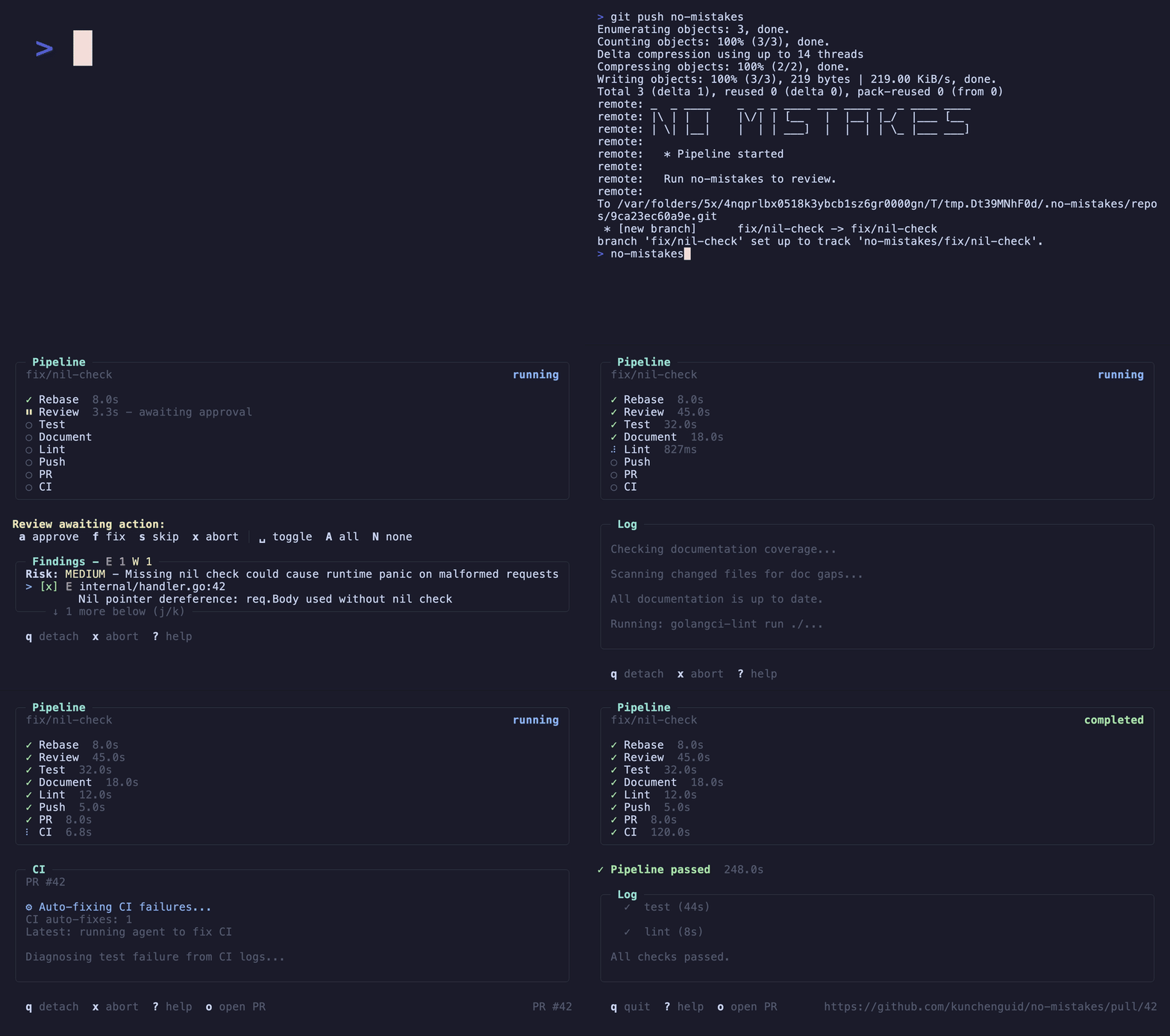
no-mistakes puts a local git proxy in front of your real remote.
Push to no-mistakes instead of origin, and it spins up a disposable worktree, runs an AI-driven validation pipeline, forwards the branch to the configured push target only after every check passes, and opens a clean PR automatically.
claude, codex, rovodev, opencode, pi, or acp:<target> via acpx./no-mistakes lets your coding agent do a task and gate it, or gate existing committed work: it runs the pipeline, has the pipeline apply safe fixes, and escalates the rest to you.Full documentation: https://kunchenguid.github.io/no-mistakes/
        your branch
            │  git push no-mistakes
            ▼
   ┌──────────────────────────────────────────────┐
   │  disposable worktree — your work stays put     │
   │  review → test → docs → lint → push → PR → CI  │
   └──────────────────────────────────────────────┘
            │  every check green
            ▼
        clean PR, opened for you
Each step either passes on its own or stops with a finding for you to act on. Safe, mechanical fixes are applied automatically; anything that touches your intent is escalated for you to approve, fix, or skip. Nothing reaches the configured push target until every check is green.
curl -fsSL https://raw.githubusercontent.com/kunchenguid/no-mistakes/main/docs/install.sh | shWindows, Go install, and build-from-source instructions are in the installation guide.
$ no-mistakes init
  ✓ Gate initialized

    repo  /Users/you/src/my-repo
    gate  no-mistakes → /Users/you/.no-mistakes/repos/abc123def456.git
  remote  git@github.com:you/my-repo.git
   skill  /no-mistakes installed for agents at user level

  Push through the gate with:
  git push no-mistakes <branch>

$ git checkout my-branch

# do some work in the branch...

$ git push no-mistakes
  * Pipeline started

  Run no-mistakes to review.

$ no-mistakes
# opens the TUI for the active run
For GitHub fork contributions, keep origin pointed at the parent repository and initialize with no-mistakes init --fork-url <your-fork-url>.
From the TUI you act on each finding: auto-fix ones are applied for you (or approve to let them), ask-user ones are a judgement call you approve, fix, or skip.
Once every check is green, the gate forwards your branch to the configured push target and opens the PR for you, so there is no manual git push origin and no hand-written PR body.
Prefer to let your coding agent drive the same flow headlessly?
Use /no-mistakes (see below).
Every change runs through the same pipeline. Pick the entry point that fits how you're working when the change is ready:
git push no-mistakes - the explicit Git path. Push a committed branch to the gate remote instead of origin.no-mistakes - the TUI. Run it after making changes (no commit needed) and a wizard walks you through creating a branch, committing, and pushing through the gate, then attaches to the run. no-mistakes -y does all of that automatically./no-mistakes - the agent skill. Tell the coding agent to do a task and gate it with /no-mistakes <task>, or use bare /no-mistakes to gate existing committed work. It runs the pipeline, has the pipeline apply safe fixes, and stops to ask you about anything that needs a human call.no-mistakes init installs the /no-mistakes skill for Claude Code and other agents. Under the hood the skill drives no-mistakes axi, a non-interactive TOON interface to the same approval flow.
See the quick start for the full first-run walkthrough.
make build   # Build bin/no-mistakes with version info
make test    # Run go test -race ./... (excludes the e2e suite)
make e2e     # Run the tagged end-to-end agent journey suite
make e2e-record # Re-record e2e fixtures when agent wire formats change
make lint    # Check generated skill drift and run go vet ./...
make skill   # Regenerate committed no-mistakes skill files
make fmt     # Run gofmt -w .
make demo    # Regenerate demo.gif and demo.mp4 (needs vhs and ffmpeg)
make docs    # Build the Astro docs site in docs/dist
See Makefile for the full target list.
make e2e-record overwrites internal/e2e/fixtures/ from the real claude, codex, and opencode CLIs, spends real API quota, and should be reviewed before committing.