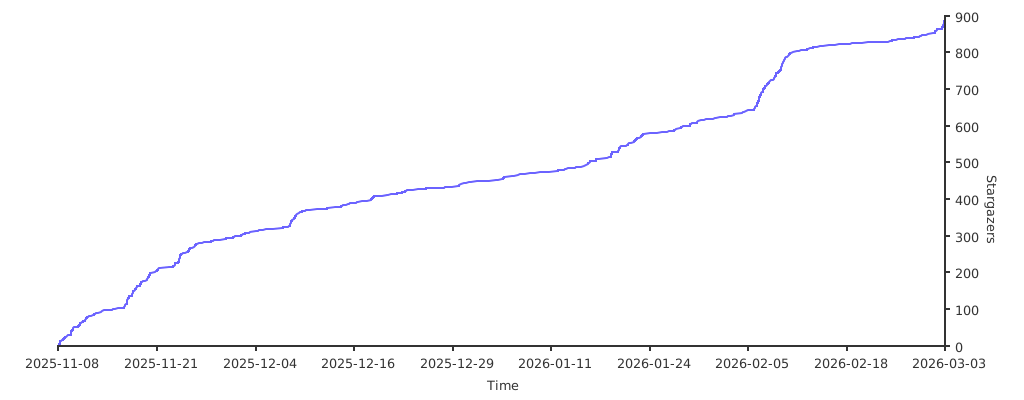
Ed1s0nZ / CyberStrikeAI
- суббота, 7 марта 2026 г. в 00:00:02
CyberStrikeAI is an AI-native security testing platform built in Go. It integrates 100+ security tools, an intelligent orchestration engine, role-based testing with predefined security roles, a skills system with specialized testing skills, and comprehensive lifecycle management capabilities.

CyberStrikeAI is an AI-native security testing platform built in Go. It integrates 100+ security tools, an intelligent orchestration engine, role-based testing with predefined security roles, a skills system with specialized testing skills, and comprehensive lifecycle management capabilities. Through native MCP protocol and AI agents, it enables end-to-end automation from conversational commands to vulnerability discovery, attack-chain analysis, knowledge retrieval, and result visualization—delivering an auditable, traceable, and collaborative testing environment for security teams.

The dashboard provides a comprehensive overview of system runtime status, security vulnerabilities, tool usage, and knowledge base, helping users quickly understand the platform's core features and current state.
Web Console
|
Attack Chain Visualization
|
Task Management
|
Vulnerability Management
|
MCP Management
|
MCP stdio Mode
|
Knowledge Base
|
Skills Management
|
Role Management
|
CyberStrikeAI ships with 100+ curated tools covering the whole kill chain:
Prerequisites:
One-Command Deployment:
git clone https://github.com/Ed1s0nZ/CyberStrikeAI.git
cd CyberStrikeAI-main
chmod +x run.sh && ./run.sh
The run.sh script will automatically:
First-Time Configuration:
Settings → Fill in your API credentials:
openai:
  api_key: "sk-your-key"
  base_url: "https://api.openai.com/v1"  # or https://api.deepseek.com/v1
model: "gpt-4o" # or deepseek-chat, claude-3-opus, etc.config.yaml directly before launchingauth.password in config.yaml)# macOS
brew install nmap sqlmap nuclei httpx gobuster feroxbuster subfinder amass
# Ubuntu/Debian
sudo apt-get install nmap sqlmap nuclei httpx gobuster feroxbusterAlternative Launch Methods:
# Direct Go run (requires manual setup)
go run cmd/server/main.go

# Manual build
go build -o cyberstrike-ai cmd/server/main.go
./cyberstrike-ai
Note: The Python virtual environment (venv/) is automatically created and managed by run.sh. Tools that require Python (like api-fuzzer, http-framework-test, etc.) will automatically use this environment.
auth.password is empty.roles/ directory.user_prompt that prepends to user messages, guiding the AI to adopt specialized testing methodologies and focus areas.tools list to limit available tools, ensuring focused testing workflows (e.g., CTF role restricts to CTF-specific utilities).read_skill tool.roles/ directory. Each role defines name, description, user_prompt, icon, tools, skills, and enabled fields.Creating a custom role (example):
roles/ (e.g., roles/custom-role.yaml):
name: Custom Role
description: Specialized testing scenario
user_prompt: You are a specialized security tester focusing on API security...
icon: "\U0001F4E1"
tools:
  - api-fuzzer
  - arjun
  - graphql-scanner
skills:
  - api-security-testing
  - sql-injection-testing
enabled: trueskills/ directory.read_skill tool to access skill details when needed.list_skills, read_skill), allowing dynamic skill retrieval during task execution.SKILL.md file with detailed testing methods, tool usage, best practices, and examples. Skills support YAML front matter for metadata.skills/ directory. Each skill directory should contain a SKILL.md file with the skill content.Creating a custom skill:
skills/ (e.g., skills/my-skill/)SKILL.md file in that directory with the skill contentskills field in the role YAML filetools/*.yaml describe commands, arguments, prompts, and metadata.security.tools_dir to a folder is usually enough; inline definitions in config.yaml remain supported for quick experiments.query_execution_result tool with paging, filters, and regex search.Creating a custom tool (typical flow)
tools/ (for example tools/sample.yaml).name, command, args, and short_description.parameters[] so the agent knows how to build CLI arguments.description/notes block if the agent needs extra context or post-processing tips.go run cmd/mcp-stdio/main.go exposes the agent to Cursor/CLI.go build -o cyberstrike-ai-mcp cmd/mcp-stdio/main.goSettings → Tools & MCP → Add Custom MCP, pick Command, then point to the compiled binary and your config:
{
  "mcpServers": {
    "cyberstrike-ai": {
      "command": "/absolute/path/to/cyberstrike-ai-mcp",
      "args": [
        "--config",
        "/absolute/path/to/config.yaml"
      ]
    }
  }
}config.yaml has mcp.enabled: true and adjust mcp.host / mcp.port if you need a non-default binding (localhost:8081 works well for local Cursor usage)../run.sh or go run cmd/server/main.go); the MCP endpoint lives at http://<host>:<port>/mcp.Base URL to http://127.0.0.1:8081/mcp..cursor/mcp.json so teammates can reuse it:
{
  "mcpServers": {
    "cyberstrike-ai-http": {
      "transport": "http",
      "url": "http://127.0.0.1:8081/mcp"
    }
  }
}CyberStrikeAI supports connecting to external MCP servers via three transport modes:
To add an external MCP server:
Open the Web UI and navigate to Settings → External MCP.
Click Add External MCP and provide the configuration in JSON format:
HTTP mode example:
{
  "my-http-mcp": {
    "transport": "http",
    "url": "http://127.0.0.1:8081/mcp",
    "description": "HTTP MCP server",
    "timeout": 30
  }
}
stdio mode example:
{
  "my-stdio-mcp": {
    "command": "python3",
    "args": ["/path/to/mcp-server.py"],
    "description": "stdio MCP server",
    "timeout": 30
  }
}
SSE mode example:
{
  "my-sse-mcp": {
    "transport": "sse",
    "url": "http://127.0.0.1:8082/sse",
    "description": "SSE MCP server",
    "timeout": 30
  }
}
Click Save and then Start to connect to the server.
Monitor the connection status, tool count, and health in real time.
SSE mode benefits:
A test SSE MCP server is available at cmd/test-sse-mcp-server/ for validation purposes.
search_knowledge_base tool.knowledge_base/ directory for Markdown files and automatically indexes them with embeddings.Quick Start (Using Pre-built Knowledge Base):
knowledge.db) and place it in the project's data/ directory.Setting up the knowledge base:
knowledge.enabled: true in config.yaml:
knowledge:
  enabled: true
  base_path: knowledge_base
  embedding:
    provider: openai
    model: text-embedding-v4
    base_url: "https://api.openai.com/v1"  # or your embedding API
    api_key: "sk-xxx"
  retrieval:
    top_k: 5
    similarity_threshold: 0.7
hybrid_weight: 0.7knowledge_base/ directory, organized by category (e.g., knowledge_base/SQL Injection/README.md).search_knowledge_base when it needs security knowledge. You can also explicitly ask: "Search the knowledge base for SQL injection techniques".Knowledge base structure:
/api/roles endpoints: GET /api/roles (list all roles), GET /api/roles/:name (get role), POST /api/roles (create role), PUT /api/roles/:name (update role), DELETE /api/roles/:name (delete role). Roles are stored as YAML files in the roles/ directory and support hot-reload./api/vulnerabilities endpoints: GET /api/vulnerabilities (list with filters), POST /api/vulnerabilities (create), GET /api/vulnerabilities/:id (get), PUT /api/vulnerabilities/:id (update), DELETE /api/vulnerabilities/:id (delete), GET /api/vulnerabilities/stats (statistics)./api/batch-tasks endpoints: POST /api/batch-tasks (create queue), GET /api/batch-tasks (list queues), GET /api/batch-tasks/:queueId (get queue), POST /api/batch-tasks/:queueId/start (start execution), POST /api/batch-tasks/:queueId/cancel (cancel), DELETE /api/batch-tasks/:queueId (delete), POST /api/batch-tasks/:queueId/tasks (add task), PUT /api/batch-tasks/:queueId/tasks/:taskId (update task), DELETE /api/batch-tasks/:queueId/tasks/:taskId (delete task). Tasks execute sequentially, each creating a separate conversation with full status tracking./api/auth/change-password, enforce short-lived sessions, and restrict MCP ports at the network layer when exposing the service.auth:
password: "change-me"
session_duration_hours: 12
server:
host: "0.0.0.0"
port: 8080
log:
level: "info"
output: "stdout"
mcp:
enabled: true
host: "0.0.0.0"
port: 8081
openai:
api_key: "sk-xxx"
base_url: "https://api.deepseek.com/v1"
model: "deepseek-chat"
database:
path: "data/conversations.db"
knowledge_db_path: "data/knowledge.db" # Optional: separate DB for knowledge base
security:
tools_dir: "tools"
knowledge:
enabled: false # Enable knowledge base feature
base_path: "knowledge_base" # Path to knowledge base directory
embedding:
provider: "openai" # Embedding provider (currently only "openai")
model: "text-embedding-v4" # Embedding model name
base_url: "" # Leave empty to use OpenAI base_url
api_key: "" # Leave empty to use OpenAI api_key
retrieval:
top_k: 5 # Number of top results to return
similarity_threshold: 0.7 # Minimum similarity score (0-1)
hybrid_weight: 0.7 # Weight for vector search (1.0 = pure vector, 0.0 = pure keyword)
roles_dir: "roles" # Role configuration directory (relative to config file)
skills_dir: "skills" # Skills directory (relative to config file)name: "nmap"
command: "nmap"
args: ["-sT", "-sV", "-sC"]
enabled: true
short_description: "Network mapping & service fingerprinting"
parameters:
- name: "target"
type: "string"
description: "IP or domain"
required: true
position: 0
- name: "ports"
type: "string"
flag: "-p"
description: "Range, e.g. 1-1000"name: Penetration Testing
description: Professional penetration testing expert for comprehensive security testing
user_prompt: You are a professional cybersecurity penetration testing expert. Please use professional penetration testing methods and tools to conduct comprehensive security testing on targets, including but not limited to SQL injection, XSS, CSRF, file inclusion, command execution and other common vulnerabilities.
icon: "\U0001F3AF"
tools:
- nmap
- sqlmap
- nuclei
- burpsuite
- metasploit
- httpx
- record_vulnerability
- list_knowledge_risk_types
- search_knowledge_base
enabled: trueCyberStrikeAI/
├── cmd/ # Server, MCP stdio entrypoints, tooling
├── internal/ # Agent, MCP core, handlers, security executor
├── web/ # Static SPA + templates
├── tools/ # YAML tool recipes (100+ examples provided)
├── roles/ # Role configurations (12+ predefined security testing roles)
├── skills/ # Skills directory (20+ predefined security testing skills)
├── docs/ # Documentation (e.g. robot/chbot guide)
├── images/ # Docs screenshots & diagrams
├── config.yaml # Runtime configuration
├── run.sh # Convenience launcher
└── README*.md
Scan open ports on 192.168.1.1
Perform a comprehensive port scan on 192.168.1.1 focusing on 80,443,22
Check if https://example.com/page?id=1 is vulnerable to SQL injection
Scan https://example.com for hidden directories and outdated software
Enumerate subdomains for example.com, then run nuclei against the results
Load the recon-engagement template, run amass/subfinder, then brute-force dirs on every live host.
Use external Burp-based MCP server for authenticated traffic replay, then pass findings back for graphing.
Compress the 5 MB nuclei report, summarize critical CVEs, and attach the artifact to the conversation.
Build an attack chain for the latest engagement and export the node list with severity >= high.

CyberStrikeAI has joined 404Starlink

This tool is for educational and authorized testing purposes only!
CyberStrikeAI is a professional security testing platform designed to assist security researchers, penetration testers, and IT professionals in conducting security assessments and vulnerability research with explicit authorization.
By using this tool, you agree to:
The developers are not responsible for any misuse! Please ensure your usage complies with local laws and regulations, and that you have obtained explicit authorization from the target system owner.
Need help or want to contribute? Open an issue or PR—community tooling additions are welcome!