alibaba / zvec
- воскресенье, 15 февраля 2026 г. в 00:00:01
A lightweight, lightning-fast, in-process vector database




🚀 Quickstart | 🏠 Home | 📚 Docs | 📊 Benchmarks | 🎮 Discord | 🐦 X (Twitter)
Zvec is an open-source, in-process vector database — lightweight, lightning-fast, and designed to embed directly into applications. Built on Proxima (Alibaba's battle-tested vector search engine), it delivers production-grade, low-latency, scalable similarity search with minimal setup.
Requirements: Python 3.10 - 3.12
pip install zvecnpm install @zvec/zvecIf you prefer to build Zvec from source, please check the Building from Source guide.
import zvec

# Define collection schema
schema = zvec.CollectionSchema(
    name="example",
    vectors=zvec.VectorSchema("embedding", zvec.DataType.VECTOR_FP32, 4),
)

# Create collection
collection = zvec.create_and_open(path="./zvec_example", schema=schema)

# Insert documents
collection.insert([
    zvec.Doc(id="doc_1", vectors={"embedding": [0.1, 0.2, 0.3, 0.4]}),
    zvec.Doc(id="doc_2", vectors={"embedding": [0.2, 0.3, 0.4, 0.1]}),
])

# Search by vector similarity
results = collection.query(
    zvec.VectorQuery("embedding", vector=[0.4, 0.3, 0.3, 0.1]),
    topk=10
)

# Results: list of {'id': str, 'score': float, ...}, sorted by relevance
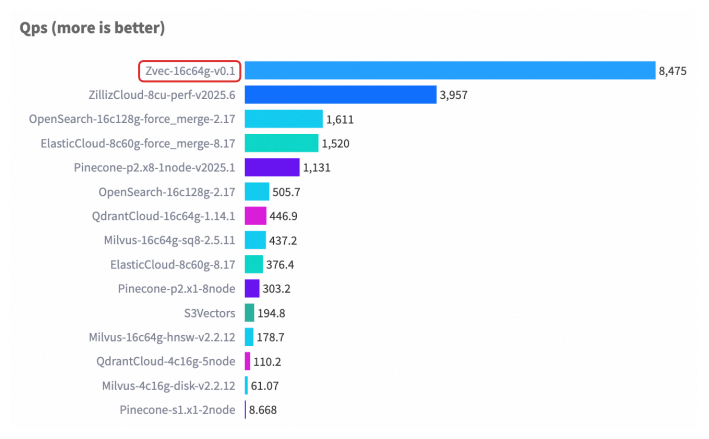
print(results)Zvec delivers exceptional speed and efficiency, making it ideal for demanding production workloads.
For detailed benchmark methodology, configurations, and complete results, please see our Benchmarks documentation.
Stay updated and get support — scan or click:
|
💬 DingTalk

|
📱 WeChat

|
🎮 Discord
Join Server
|
🐦 X (Twitter)
Follow @zvec_ai
|
We welcome and appreciate contributions from the community! Whether you're fixing a bug, adding a feature, or improving documentation, your help makes Zvec better for everyone.
Check out our Contributing Guide to get started!